
Structural Design
A practical course in the analysis and design of RCC buildings for civil engineers. Learn loads, ETABS and STAAD.Pro modelling, and the design of every structural element to IS, BS and ACI codes, taught by CBG structural engineers.
- 8 Sections
- 36 Lessons
- 1 Assignment

This course includes
- Live online classes with CBG structural design engineers
- 6 RCC modules and 31 sessions, from loads to foundations
- ETABS, STAAD.Pro and SAFE in a real G+5 building workflow
- Design to IS codes, with BS 8110 and ACI 318 versions
- Step-by-step worked examples for every structural element
- CV sessions, mock interviews and placement support
CBG Training Institute · Live online
One real building, from loads to foundations
Structural engineers make sure buildings stand up safely and economically. You follow their workflow on a real multi-storey RCC building, from the framing plan and the loads to the ETABS model, then design every beam, slab, column, wall and foundation by hand, checking the software as a practising engineer would.
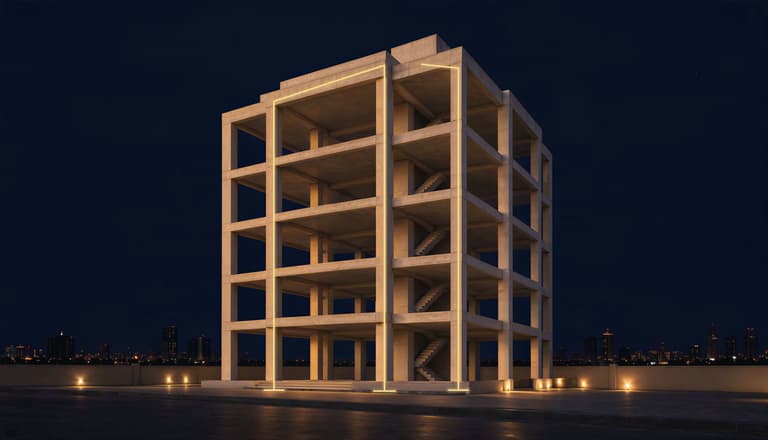
Example take-down
- Slab self-weight 3.753.75 kN/m²
- Floor finish 1.51.5 kN/m²
- Imposed load 22 kN/m²
- Load per floor 206206 kN
- Column load, 6 levels 1,4501,450 kN
- Factored load 2,1752,175 kN
Ready to size the column and its footing
- 6RCC modules
- 31sessions
- 3design codes
- 4software tools
Course Content
Welcome to Your Structural Design Course
Course Orientation
How Evaluation, Certificates and Support Work
Sign and Submit Your CBG Learner Agreement
Introduction to Structural Design
Framing Plan and Soil Investigation
Introduction to ETABS
Introduction to STAAD.Pro
Gravity Loads
Wind Loads Part 1: Concepts and IS 875-3
Wind Loads Part 2: BS and ASCE 7
Seismic Loads Part 1: Concepts and IS 1893
Seismic Loads Part 2: Eurocode 8 and ASCE 7
Load Combinations and Stiffness Modifiers
Modelling Definitions in ETABS
Wind and Seismic Load Assignments
Model Checks in ETABS
Static and Dynamic Analysis
Manual Verification of Software Output
RCC Beam Design to IS 456
RCC Beam Design to BS 8110
RCC Beam Design to ACI 318
RCC Slab Design to IS 456
RCC Slab Design to BS 8110
Cantilever Slab Design
RCC Column Design
Staircase Design
Shear Wall Design
Isolated Footing Design
Combined Footing Design
Pile Foundations
RCC Pile Design
Pile Cap Design
Retaining Wall Design
Water Tank Design
Your Certificates
Course Feedback
One course, one real building, start to finish
Everything below is part of your course, from your first class to your job search.
Live online classes.
Taught live by CBG structural design engineers, with the slides for every session on this platform.
6 RCC modules, 31 sessions.
From loads to foundations, in the order you meet them on a real project.
Software on a real building.
ETABS, STAAD.Pro and SAFE in a real G+5 building workflow, plus AutoCAD.
Three design codes.
Design to IS codes, with BS 8110 and ACI 318 versions of the key topics, since Gulf projects use all three.
Worked examples.
Step-by-step worked examples for every structural element.
CV and interview preparation.
CV sessions, a line-by-line CV review, interview preparation and mock interviews. CBG has supported 500+ global placements.
Your learning path: 6 modules, 31 sessions
After the Start Here orientation, the 6 modules follow the work on a real multi-storey building, from the framing plan and the loads to the model, the design of each element and the foundations.
31sessions
Introduction to Structural Design
- Explain the structural engineer's role and the design process from architectural drawings to GFC drawings
- Prepare a framing plan and read a soil investigation report
- 1.1 Introduction to Structural Design
- 1.2 Framing Plan and Soil Investigation
Structural Analysis Software
- Model, load and analyse a building in ETABS and STAAD.Pro
- 2.1 Introduction to ETABS
- 2.2 Introduction to STAAD.Pro
Loads on Structures
- Calculate gravity, wind and seismic loads to IS 875 and IS 1893, with BS and ASCE 7 comparisons
- Set up load combinations and cracked-section stiffness modifiers
- 3.1 Gravity Loads
- 3.2 Wind Loads Part 1: Concepts and IS 875-3
- 3.3 Wind Loads Part 2: BS and ASCE 7
- 3.4 Seismic Loads Part 1: Concepts and IS 1893
- 3.5 Seismic Loads Part 2: Eurocode 8 and ASCE 7
- 3.6 Load Combinations and Stiffness Modifiers
Modelling and Analysis in ETABS
- Run model checks for drift, displacement and irregularities, and static and dynamic analysis
- Verify software output with quick hand calculations
- 4.1 Modelling Definitions in ETABS
- 4.2 Wind and Seismic Load Assignments
- 4.3 Model Checks in ETABS
- 4.4 Static and Dynamic Analysis
- 4.5 Manual Verification of Software Output
Design of RCC Superstructure
- Design RCC beams to IS 456, BS 8110 and ACI 318
- Design one-way, two-way and cantilever slabs
- Design columns, staircases and shear walls, with code-compliant detailing
- 5.1 RCC Beam Design to IS 456
- 5.2 RCC Beam Design to BS 8110
- 5.3 RCC Beam Design to ACI 318
- 5.4 RCC Slab Design to IS 456
- 5.5 RCC Slab Design to BS 8110
- 5.6 Cantilever Slab Design
- 5.7 RCC Column Design
- 5.8 Staircase Design
- 5.9 Shear Wall Design
Foundations and Special Structures
- Design isolated and combined footings, piles and pile caps
- Design cantilever retaining walls and rectangular water tanks
- 6.1 Isolated Footing Design
- 6.2 Combined Footing Design
- 6.3 Pile Foundations
- 6.4 RCC Pile Design
- 6.5 Pile Cap Design
- 6.6 Retaining Wall Design
- 6.7 Water Tank Design
Move the load. Watch the beam answer.
Every beam you design in Module 5 starts here. Where the load sits sets the bending moment and the shear, and the bending moment decides where the steel goes. Slide the load and change the supports to see it.
- Load at
- 3.0 m
- Max sagging moment
- 150 kN·m
- Max hogging moment
- 0 kN·m
- Max shear
- 50 kN
Below the ground, where every load ends up
Every load you calculate in Module 3 finishes its journey in the soil. In Module 6 you design what carries it there, from isolated and combined footings to piles and pile caps, and the retaining walls that hold the ground back, reading the soil report you met in Module 1.


- Isolated footing
- Combined footing
- Pile cap
- Piles
- Retaining wall
How your classes run
Live online classes.
Taught by CBG structural engineers. The slides for every session are on this platform.
What you need to know first.
A degree or diploma in civil engineering, with the basics of strength of materials and structural analysis. You do not need prior experience with ETABS or STAAD.Pro.
Software.
ETABS, STAAD.Pro, SAFE and AutoCAD. Install them before the software module starts.
Questions during the course.
Your batch WhatsApp group is the official channel for announcements and questions.
Your CBG certificate
Earn a CBG Course Completion Certificate when you meet the attendance, assignment and course progress requirements.
Course Completion Certificate
Your CBG certificate for completing the Structural Design course.
Your faculty: structural engineers who do the job
Practising structural engineers with 7 to 10+ years in structural design.

Naveen George
Structural Engineer
Structural engineer with 7.5 years in structural engineering.

Kripanjith V P
Senior Structural Engineer
Senior structural engineer with 10+ years in structural design.

Abdul S Moideen
Senior Structural Engineer
Senior structural engineer with 8 years in structural design.

Muhammed Shahid P T
Senior Structural Engineer
Senior structural engineer with 7+ years in structural design.
In their words: learners on the course
What learners say about the classes and the faculty.
I am thoroughly enjoying the Structural Design course, as it’s highly relevant and practical from a job perspective, which I believe is its biggest strength. The course content is well-structured, focusing on real-world applications that prepare us for industry challenges. This emphasis on job-oriented skills is exactly what I was looking for. Naveen Sir is exceptional in his teaching approach. He is incredibly friendly and approachable, creating an environment where I feel comfortable asking questions, no matter how trivial they may seem. His openness encourages us to fully engage and clear any doubts without hesitation, which significantly enhances the learning experience.
 Pooja
PoojaThe classroom environment is clear and supportive. Lessons are explained in an easy-to-understand way, and any doubts are promptly addressed. This makes learning a positive and confident experience for everyone.
 Shameem Shamsudheen
Quoted word for word, as the learners wrote them.
Where it can take you
The course prepares you for structural design roles such as these.
- Structural Design Engineer in a consultancy
- Structural Engineer with a contractor
- In-house Structural Engineer with a builder
- Junior Design Engineer
Student FAQ
Who is this course for?
Civil engineering graduates, freshers and working professionals who want a career in structural design, in a consultancy, with a contractor or as an in-house structural engineer.
What background do I need?
A degree or diploma in civil engineering, with the basics of strength of materials and structural analysis. You do not need prior experience with ETABS or STAAD.Pro.
Which software will I use?
ETABS, STAAD.Pro, SAFE and AutoCAD. Install them before the software module starts.
Which design codes are covered?
Mainly the Indian Standards (IS 456, IS 875, IS 1893, IS 13920, IS 2911, IS 3370), with British Standard and American (ACI 318, ASCE 7) versions of the key topics, since Gulf projects use all three.
How are classes delivered?
Through live online classes with CBG structural engineers. The slides for every session are on this platform.
Does the course cover steel design?
Steel design modules will be added to this course.
Will I get a certificate?
Yes. You can earn a CBG Course Completion Certificate when you meet the attendance, assignment and course progress requirements.
Do you help with jobs?
CBG runs CV sessions, a line-by-line CV review, interview preparation and mock interviews, and has supported 500+ global placements.
How do I enrol?
Enrolment is by invitation. Use the Contact To Enroll button to message CBG on WhatsApp, and the team will guide you through enrolment and payment.
Who do I contact with questions during the course?
Your batch WhatsApp group is the official channel for announcements and questions.


Structural Design
This course includes
- Live online classes with CBG structural design engineers
- 6 RCC modules and 31 sessions, from loads to foundations
- ETABS, STAAD.Pro and SAFE in a real G+5 building workflow
- Design to IS codes, with BS 8110 and ACI 318 versions
- Step-by-step worked examples for every structural element
- CV sessions, mock interviews and placement support